


Smart Pet Feeder App Customization: Features Brands Commonly Request
Smart pet feeders are no longer only about dispensing food on a timer. For many brand owners, DTC brands and Amazon sellers, the app experience has become an important part of product value.
An automatic pet feeder may have reliable hardware, good packaging and an attractive price. However, if the app is difficult to use, unclear or poorly aligned with the brand experience, customers may feel disappointed. As a result, app customization has become a common topic in smart pet feeder OEM and private label projects.
For buyers selling in Europe and North America, app customization can help improve user experience, strengthen brand identity and support clearer product positioning. At the same time, app changes can also affect development time, testing workload, MOQ and after-sales risk.
This guide explains the smart pet feeder app customization features brands commonly request and what B2B buyers should consider before starting an OEM project.
- Why App Customization Matters for Smart Pet Feeders
- App Customization Is Not One Single Thing
- 1. App Interface Branding
- 2. Feeding Schedule Customization
- 3. Portion Control and Feeding Accuracy Display
- 4. Low Food and Device Status Reminders
- 5. Camera Function Customization
- 6. Multi-User and Family Sharing
- 7. Language and Regional Support
- 8. App Setup and QR Code Experience
- 9. Feeding Records and Data Display
- 10. Firmware and App Update Support
- 11. Branding vs Full Custom App Development
- 12. How App Customization Affects MOQ, Cost and Timeline
- 13. Testing App Functions Before Mass Production
- Smart Pet Feeder App Customization Checklist
- Work With a Smart Pet Feeder OEM Manufacturer
Why App Customization Matters for Smart Pet Feeders
For smart pet feeders, the app is not just an extra function. It is often the main way users interact with the product after purchase.
Through the app, pet owners may:
- Set feeding schedules
- Adjust portion sizes
- Check feeding records
- Receive low food alerts
- Watch pets through a camera
- Record or play voice messages
- Share device access with family members
- Receive device status notifications
- Update settings remotely
Therefore, the app experience can directly affect customer satisfaction, product reviews and return rates.
For brands, the app also creates a chance to build a more complete product experience. A feeder with good hardware and a clear app can feel more premium than a basic automatic feeder with limited interaction.
App Customization Is Not One Single Thing
Before discussing customization with a factory, buyers should understand that app customization can range from light branding to deep software development.
In many OEM projects, app customization may include:
- Brand logo display
- App interface color adjustment
- Product name customization
- Notification wording
- Feeding schedule settings
- Camera function configuration
- Language support
- User manual and QR code setup
- Device sharing settings
- Data display changes
- Firmware update support
However, not every customization option has the same cost or complexity. For example, adding a logo may be much easier than developing a new feeding algorithm or building a fully customized app. For this reason, buyers should separate must-have app requirements from optional features before requesting a quotation.
1. App Interface Branding
App interface branding is one of the most common requests from private label smart pet feeder buyers.
Branding may include:
- Brand logo on the app interface
- Customized product name
- Brand color elements
- Device icon adjustment
- Welcome screen or setup screen changes
- Branded user guidance
For DTC brands and Amazon sellers, app branding can make the product feel more professional and consistent. It also helps customers recognize that the feeder belongs to the same product line as the brand's packaging, website and customer support.
However, buyers should confirm how much branding is actually supported. Some suppliers may offer light branding inside an existing app, while others may support deeper app interface customization.
Questions to Ask the Supplier
- Can our logo appear in the app?
- Can the device name use our brand?
- Can app colors or icons be customized?
- Is this a shared app or a dedicated app?
- What MOQ is required for app branding?
- How long does app branding take?
- Will branding affect app store review or updates?
These questions help buyers understand whether the app solution matches the brand's expectations.
2. Feeding Schedule Customization
Feeding schedules are the core function of a smart pet feeder app.
Most users expect to set feeding times, portion sizes and repeat plans easily. If the scheduling function is confusing, customers may complain even if the feeder dispenses food correctly.
Common feeding schedule features include:
- Multiple meals per day
- Portion size adjustment
- Daily or weekly repeat settings
- Manual feeding button
- Feeding history
- Temporary pause
- Multi-pet feeding support
- Time zone settings
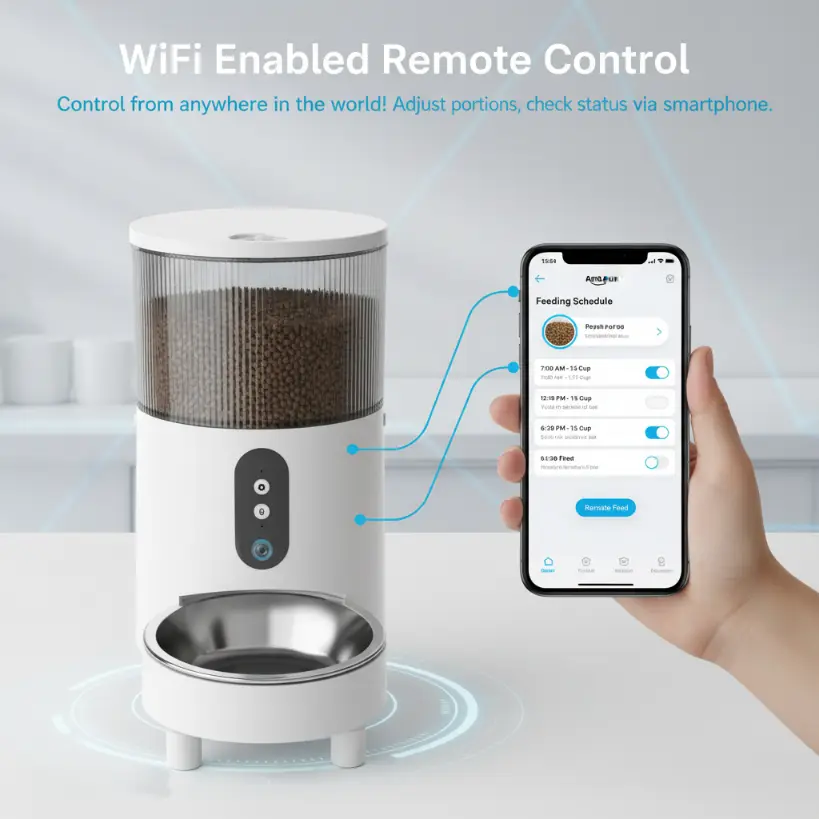
For brands, feeding schedule customization may involve deciding which options are shown to users and how simple the setup process should be.
For example, an entry-level feeder should make scheduling quick and easy. In contrast, a premium app-controlled feeder may include more detailed feeding records, multiple schedules and advanced settings.
B2B Sourcing Tip
Ask the supplier to demonstrate the full scheduling process, not only the final feeding result. The app should be easy for first-time users to understand.
3. Portion Control and Feeding Accuracy Display
Portion control is one of the main reasons customers buy smart pet feeders.
App customization may involve how portion sizes are displayed. Some apps show portions by serving number, while others may show estimated grams or cup volume. Buyers should be careful with this because portion accuracy can vary depending on kibble size, shape and density.
Common customization considerations include:
- Portion unit display
- Feeding amount explanation
- Feeding record format
- Portion adjustment range
- Warning text about food size compatibility
- Setup guidance for first-time users
For Amazon sellers, unclear portion descriptions can create negative reviews. If users expect exact gram-level feeding but the product works by mechanical portions, the listing and app should explain this clearly.
Therefore, app wording should match real product performance.
4. Low Food and Device Status Reminders
Reminders are an important part of the smart feeder user experience.
Common reminders include:
- Low food alert
- Feeding completed notification
- Feeding failed notification
- Device offline reminder
- Low battery alert
- Power disconnection alert
- Food jam warning
- Cleaning reminder
- Desiccant replacement reminder
For brands, reminder customization can improve user experience and reduce after-sales questions. However, reminders should be accurate and useful. Too many notifications can annoy users, while missing important alerts can reduce trust.
Notification Wording
Some brands may request customized notification wording. For example, the app may use a warmer tone for pet owners or a more direct tone for practical product users.
Nevertheless, notification text should remain clear. Users need to understand what happened and what action they should take.
B2B Sourcing Tip
Ask which reminders are supported by the hardware. A reminder can only be reliable if the product has the right sensor, function or data source.
5. Camera Function Customization
Camera feeders are popular because they combine feeding with remote monitoring.
For brands, camera-related app features may include:
- Live video view
- Photo capture
- Video recording
- Night vision
- Two-way audio
- Motion detection
- Feeding video record
- Pet watching during meals
- Cloud or local storage options
- Camera privacy settings
Camera functions can improve product value, but they also increase complexity. Buyers should evaluate camera quality, app stability, network performance and privacy messaging carefully.
For European and North American markets, users may care about how video data is handled. Therefore, product pages, manuals and app messaging should be clear and responsible.
Questions to Ask the Supplier
- What is the camera resolution?
- Does the app support live viewing?
- Is two-way audio available?
- Are photos or videos stored?
- Is cloud storage required?
- Are there extra subscription fees?
- How does the app handle privacy information?
- Does the camera function affect product cost or MOQ?
For first-time buyers, a non-camera feeder may be easier to launch. However, for brands targeting premium customers, camera feeders can offer stronger differentiation.
6. Multi-User and Family Sharing
Many pet owners do not care for pets alone. Family members, roommates or pet sitters may also need access to the feeder.
App sharing features may include:
- Multiple user access
- Main account and sub-account permissions
- Device sharing by QR code or invitation
- Shared feeding history
- Permission control
- Multi-device management
This feature can improve convenience, especially for households with more than one caregiver.
For brand owners, multi-user sharing can be a strong selling point if it is simple and reliable. However, the setup process should be easy to explain in the user manual.
7. Language and Regional Support
For products sold in Europe and North America, language support can affect both customer experience and retail readiness.
Common language needs may include:
- English
- German
- French
- Spanish
- Italian
- Dutch
- Other market-specific languages
For Amazon Europe, product listings, manuals and app instructions may need local language support depending on the marketplace. Although exact requirements vary, buyers should discuss language needs early.
App language customization may include:
- Interface translation
- Notification translation
- Setup guide translation
- Error message translation
- FAQ or troubleshooting text
Poor translation can make a product feel low quality. Therefore, brands should review app language carefully before launch.
8. App Setup and QR Code Experience
The first app setup experience is one of the most important moments after purchase.
If users cannot connect the feeder quickly, they may return the product or leave a negative review.
Buyers should check:
- QR code accuracy
- App download process
- Account registration
- Wi-Fi pairing steps
- 2.4 GHz Wi-Fi support explanation
- Device reset instructions
- Error message clarity
- Setup time
- Troubleshooting guidance
For Amazon sellers, setup problems are especially risky because customers may not contact support before leaving a review.
As a result, the app setup flow, user manual and product page should all explain connection steps clearly.
9. Feeding Records and Data Display
Feeding records help users confirm whether pets have been fed as planned.
App data may include:
- Feeding time
- Feeding amount
- Manual feeding records
- Missed feeding alerts
- Feeding history by day
- Device status logs
- Multiple pet records, if supported
For brands, data display can help the product feel more useful and trustworthy. However, the data should be easy to read. Too much information can confuse users.
Buyers should decide whether the product is positioned as a simple convenience feeder or a more advanced smart feeding device.
10. Firmware and App Update Support
Smart pet feeder apps may need updates after launch. Firmware updates can improve device stability, fix bugs or add functions.
Buyers should ask the supplier:
- How are app updates handled?
- How are firmware updates handled?
- Who maintains the app?
- Can bugs be fixed after launch?
- How often is the app updated?
- What happens if the app store policy changes?
- Is long-term app support available?
This is especially important for DTC brands and Amazon sellers planning long-term sales. A product should not depend on an app that cannot be maintained.
11. Branding vs Full Custom App Development
Many buyers say they want a custom app, but the meaning can be different. There are usually several levels:
Light App Branding
This may include logo, product name, language and simple interface changes. It is usually faster and more suitable for smaller orders.
Feature Configuration
This may include enabling or disabling certain functions, adjusting notifications, changing schedule options or modifying data display.
Dedicated App Solution
This may involve a more brand-specific app environment. It can support stronger brand control, but may require more time, budget, testing and MOQ.
Fully Custom App Development
This is the deepest level. It may involve custom UX design, new functions, backend development, data systems, long-term maintenance and app store management.
For most first-time smart pet feeder buyers, light branding or mature app solutions are more practical. In contrast, full custom app development is better for established brands with clear product roadmaps and larger order plans.
12. How App Customization Affects MOQ, Cost and Timeline
App customization can affect project planning.
Buyers should expect app-related decisions to influence:
- Sample lead time
- Development cost
- MOQ
- Testing workload
- Certification or documentation review
- App store update timeline
- User manual preparation
- After-sales support
Simple app branding may be relatively fast. However, deeper feature changes or dedicated app development may require more communication, testing and approval.
Therefore, buyers should discuss app requirements before quotation, not after sample approval.
13. Testing App Functions Before Mass Production
App testing should happen before mass production.
Buyers should test:
- App download
- Account setup
- Device pairing
- Feeding schedule setup
- Manual feeding
- Notifications
- Camera function, if available
- Device sharing
- Reset process
- Wi-Fi reconnection
- Language display
- Firmware version
- User manual consistency
Testing should be done on both iOS and Android if the product is sold broadly. In addition, buyers should test with realistic home network conditions, not only in a factory office.
Good app testing can reduce returns, support tickets and negative reviews.
Smart Pet Feeder App Customization Checklist
Before starting an app customization project, review this checklist:
- Do you need app branding or a dedicated app?
- Should your logo appear in the app?
- Which feeding schedule features are required?
- How should portion control be displayed?
- Which reminders are necessary?
- Is a camera function required?
- Is two-way audio needed?
- Do users need multi-user sharing?
- Which languages are required?
- Is the setup process easy to explain?
- Are app instructions included in the manual?
- Who maintains app and firmware updates?
- What app customization affects MOQ?
- What app customization affects timeline?
- Has the app been tested on iOS and Android?
This checklist can help buyers communicate more clearly with the supplier and avoid costly misunderstandings.
Work With a Smart Pet Feeder OEM Manufacturer
Smart pet feeder app customization can help brands create a better user experience and stronger product identity. However, app customization should be planned carefully. Buyers need to understand which features are mature, which features require development and how app changes affect cost, MOQ, testing and launch timing.
For brand owners, DTC brands and Amazon sellers, the best approach is to start with clear app requirements, test the user experience carefully and choose a supplier that understands both hardware and app-connected smart pet products.
Chongkexing supplies automatic pet feeders and related smart pet products for global B2B buyers. We support small batch trial orders, ready-stock wholesale, OEM/ODM projects, light customization, private label packaging, app-related customization discussion and product document support for buyers entering European and North American markets.